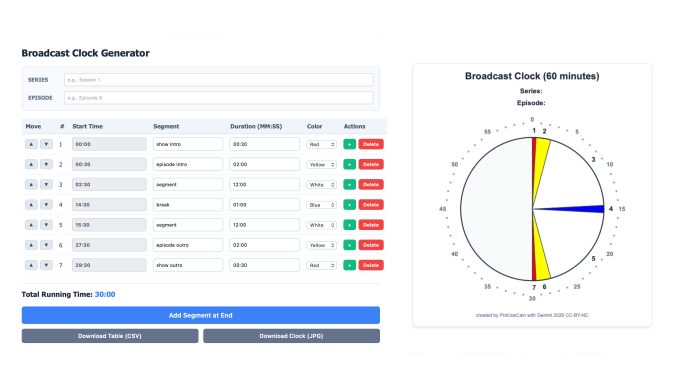
I needed a quick and easy broadcast clock for creating podcast episodes. (There is a great episode of ‘99% Invisible’ on broadcast clocks that is well worth listening to.) While I found a few apps offered for sale, nothing really did the trick. I thought Broadcast Clock Creator was the best app on the market, but it has a few shortcomings I wanted to design around. To solve the problem, I made one myself, using about an hour of conversation with Gemini GenAI to create and refine code for a simple online app. It does the job I need it to do.
This is the broadcast clock <profjoecain.net/clock>. Version 1.0.
Use it for free.
The app is designed for a 60-minute output cycle. The app allows a user to list programme segments and timings. Colours in the clock can be modified. When finished, it allows users to download the segment list as a *.csv file and to download the clock’s pie chart as a *.jpg. There is no other save or upload feature. (I’m not *that* good with coding.) An example of the output is below.
What this clock lacks is a way to insert segment titles into the clock face. I’ll work on that for version 2.0.
Output from ProfJoeCain’s broadcast clock
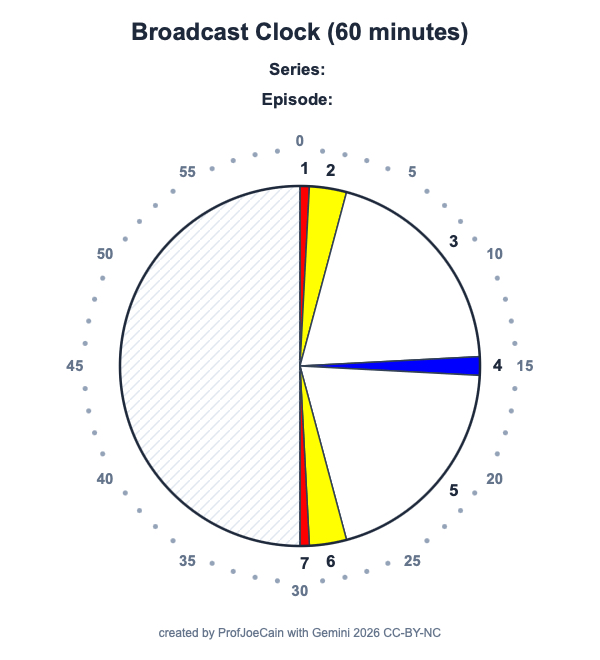
The segment list downloads as a *csv file. The chart below was used to create the clock above.
| Series: | Series 1 | |||
| Episode: | Episode 1 | |||
| Segment Number | # Start Time | Segment Name | Duration (MM:SS) | Color Theme |
| 1 | 00:00 | show intro | 00:30 | red |
| 2 | 00:30 | episode intro | 02:00 | yellow |
| 3 | 02:30 | segment | 12:00 | white |
| 4 | 14:30 | break | 01:00 | blue |
| 5 | 15:30 | segment | 12:00 | white |
| 6 | 27:30 | episode outro | 02:00 | yellow |
| 7 | 29:30 | show outro | 00:30 | red |
This broadcast clock is provided as a free tool. It is CC-BY-NC. If anyone tries to see it to you, they have stolen my copyrighted intellectual property, and you should not hand over any money to them.